The Bajoran Engineer Engineering Software
AI Agents for Your Business: How A Build Grows in the Wild
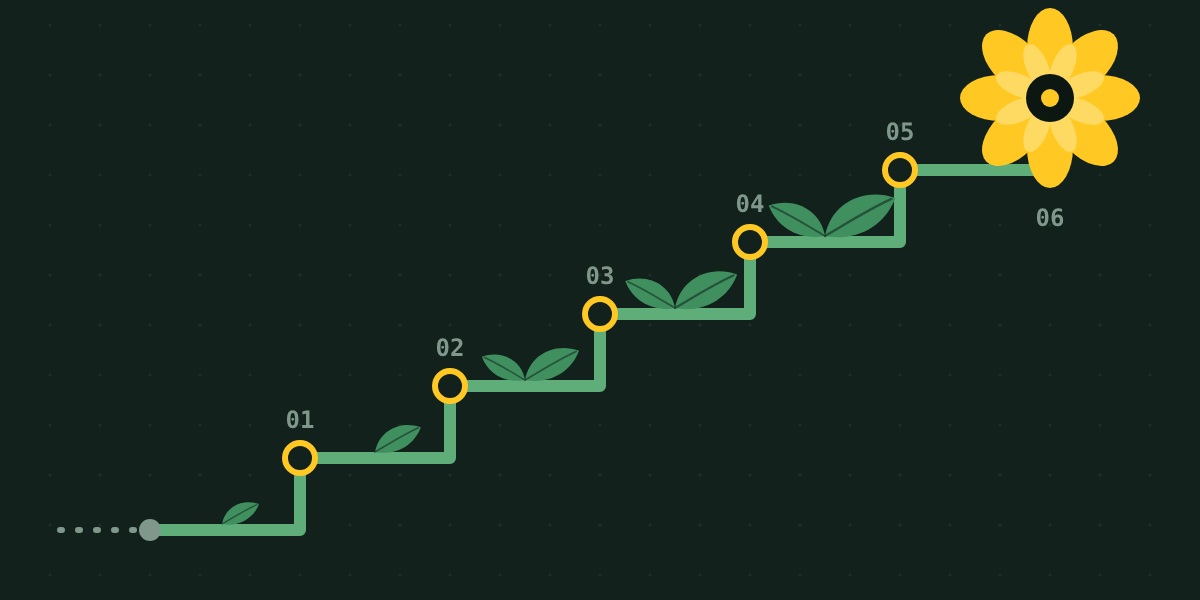
Client builds grow in a predictable order. Here are the six increments I add to every worker-agent system, shown on the flower shop repo: connections, skills, tests, automation, observability and a control plane the owner can run.
I'm building an agency. Wildflower Software builds worker-agent systems for businesses, from three-person shops to enterprise operations teams. Last week I published a flower shop blueprint on the company site, witha repo that shows where every build starts.
Builds in the wild grow in stages, and the order is fairly predictable: each increment is the next thing the business asks for.
This post walks through that order on the flower shop repo, because I'm growing it the same way I grow client work.
How a build grows
Every build starts where the repo is today, with four guarantees:
- A worker can only call the tools on its allow-list.
- Anything that spends, sends or publishes waits for a person's approval.
- A queued action reports itself as queued, not done.
- The coordinator's only tools are the workers.
From there, each increment adds one capability, comes with a test, and keeps those four in place. I work this way with clients so that every increment is something the owner can use and judge before we start the next one.
Increment 1: connect the systems the business already runs
A real build begins by plugging into what the business already uses. For the flower shop that's the POS, email, the calendar and the wholesaler, each reached through an MCP server. Tool keeps its shape, so the runner and the approval gate stay the same.
approvals.py
    def requires_approval(server: str, tool: str) -> bool:
    return POLICY.get((server, tool), NEEDS_APPROVAL) is NEEDS_APPROVAL
Create a policy table. Approval rules are keyed by server and tool name. A tool that isn't in the table is queued for approval by default.
A startup check. MCP tools can carry annotations such as readOnlyHint and destructiveHint. At startup the app compares them with the policy table and stops if a tool marked auto-run is described by its server as destructive.
Server-scoped allow-lists. ("check_inventory", "list_orders") becomes ("pos.check_inventory", "pos.list_orders") , and each worker connects only to the servers its job uses.
The approval queue as an MCP server. List pending, approve and reject become tools, so the owner can clear the queue from any MCP client. The approve tool is never on a worker's allow-list, and a test covers that.
Pinned servers. Server versions are pinned and the tool list is snapshotted, with an alert when it changes.
Elicitation. Where a server and client both support MCP's confirm-before-acting prompt, it runs in addition to the gate.
Increment 2: write down how the business does things
Once the systems are connected, the work turns to how this particular shop does things: how it prices a wedding, what it orders ahead of Mother's Day. That knowledge goes into skills. A skill is a folder: SKILL.md says when to use it and how the job is done, and the files beside it hold reference material such as a price sheet. Each worker sees a skill's short description and loads the rest when a task calls for it.
Files
    skills/
  wedding-quote/
    SKILL.md        # when to use it, the steps, what to ask the customer
    pricing.md      # markups, minimums, delivery zones
  holiday-wholesale/
    SKILL.md
Worker gains one field, so it becomes job, tools and skills. The first two skills are wedding quotes and the holiday wholesale order.
Skills leave the allow-list as it is: a worker with a new skill can call the same tools as before. Skills are also plain markdown, so a shop owner can read and edit them. For that reason they ship together with the evals in increment 3.
Increment 3: agree on how we'll know it works
Before anything runs unattended, the owner and I agree on how we'll know it's working, and that agreement becomes tests. The repo already has offline tests for the four guarantees. This increment adds three more kinds.
A property test for the gate. It generates random sequences of tool calls and owner decisions, and asserts that an approval-required tool only runs after an approval.
Evals per worker. Each one runs a worker against a fixed shop state and one task, then checks the tool calls and the approval queue.
evals.py
    def test_wedding_inquiry_queues_one_quote(shop, run):
    report, gate = run("orders", "Quote the June wedding inquiry")
    [action] = gate.open_items()
    assert action.tool == "send_quote"
    assert action.args["amount"] <= 4000   # the customer said about $4k
    assert action.reason
    assert not shop["sent"]
Status-report evals. After an action is queued, the worker's report has to describe it as waiting for approval. A grader checks each report against that one yes-or-no question, and I spot-check the grades.
Evals run whenever a prompt, a skill, the policy or the model changes. Each case runs several times and is tracked as a pass rate.
Increment 4: let it run on its own
This is where the system starts earning its keep. Runs start on their own: the morning brief on a schedule, and the orders worker whenever a new inquiry arrives. Approval still goes to a person.
- A database-backed queue. Pending actions move into a database table, so they persist across restarts.
- Expiry and re-check. Each queued action gets an expiry, and its details are checked against current stock and orders at the moment of approval. A wholesale order drafted at 7am and approved at 4pm reflects what's in the cooler at 4pm.
- Idempotency keys. An approved action runs exactly once, across retries and restarts.
- Approvals in chat. Queued actions are delivered to the place the owner already checks, with approve and reject on the message.
- CI. The offline tests run on every push. Evals run on changes to prompts, skills or policy.
Increment 5: see what it's doing
Once it runs every day, the questions change: how long do things take, what do they cost, where do approvals pile up? The audit log records who approved what. This increment adds traces and a few metrics alongside it.
Traces. Runs are traced with OpenTelemetry's GenAI conventions: an invoke_agent span for the coordinator and each worker, a chat span per model call and an execute_tool span per tool call. The gate's decision is an attribute on the tool span. The conventions are still in development, so the span names are defined in one module.
A shared ID. The approval ID appears in both the audit log and the trace, so any approval links to the run that produced it.
Four metrics:
- Time from queued to decided
- Approval and rejection rate, per worker and per tool
- Turns per task
- Tokens and cost per brief
Redaction. Customer emails and order details are removed from traces before export. The audit log stays append-only and is retained separately.
Increment 6: hand over the controls
The last increment is the handover. A build is finished when the people who run the business can run the system too, so the control plane gets two front doors onto one policy.
For technical users. Workers, policy and skills are files in the repo. Changes go through pull requests, and the evals run on each one. The CLI gains three commands: replay a run from its trace, run one worker's evals, and print what a worker is allowed to touch.
For non-technical users:
- An approvals inbox with approve, reject, and edit-then-approve. The audit log keeps both the original and the edited version.
- A permissions page showing what each worker can touch, generated from the policy file.
- A few settings, such as an auto-approve threshold for wholesale orders or a pause switch for one worker.
Both sides edit the same policy. The technical side sets the limits, for example a ceiling on any auto-approve threshold, and the owner adjusts settings within them. Every settings change is written to the audit log.
requires_approval grows from a boolean into a rule that considers the tool, the amount, the recipient and who is asking. In a small shop the approver is the owner. In a larger organization it's a role, with thresholds per role and an escalation path.
That's the order I follow on client work, and it's the order this repo will grow in. The code is at wildflower-software/flower-shop-agents. I'll write up each increment here as I build it.
If this post helped, you can support my open source work on Ko-fi.
Related Entries
From notebook to scheduled agent in 20 minutes
A lot of the agents I get asked about are still notebooks. That's a fine place to start, because a …

Building an Agentic Python App for Mobile
This blog post was written after a lovely conversation with one …